给 WordPress 添加了评论回复邮件提醒功能,但是测试时无法收到邮件。查看 Web 服务器错误日志,看到 WP_Error Object: wp_mail_failed: SMTP Failed to connect to server 等报错信息。SMTP 连接信息和用户名与密码都是正确的,仅凭这一点报错信息不能确定 SMTP 无法连接到服务器的具体原因,所以单独写一个测试程序 test_mail.php 放到 WordPress 程序根目录下,打印详细的调试信息。test_mail.php 代码如下:
<?php
error_reporting(E_ALL);

echo "importing\n";
require_once 'wp-includes/PHPMailer/PHPMailer.php';
require_once 'wp-includes/PHPMailer/SMTP.php';

echo "creating mailer\n";
$mail = new PHPMailer\PHPMailer\PHPMailer();

echo "setting\n";
$mail->CharSet="UTF-8";           //设定邮件编码,默认ISO-8859-1,如果发中文此项必须设置为 UTF-8
$mail->isSMTP();                  //设定使用SMTP服务
$mail->SMTPAuth = true;           //启用SMTP验证功能
$mail->SMTPSecure = "ssl";        //启用SSL
$mail->SMTPDebug = true;
$mail->Host = "smtpdm.aliyun.com";                                //SMTP服务器
$mail->Port = 465;                                                //SMTP服务器的端口号
$mail->Username = "USERNAME";                                     //SMTP服务器用户名
$mail->Password = "PASSWORD";                                     //SMTP服务器密码
$mail->setFrom('notifications@www.eulerkey.cn', 'EulerKey');      //设置发件人地址和名称
$mail->addReplyTo("notifications@www.eulerkey.cn","EulerKey");    //设置邮件回复人地址和名称
$mail->Subject = '邮件标题';                                      //设置邮件标题
$mail->AltBody = "为了查看该邮件,请切换到支持HTML的邮件客户端";     //可选项,向下兼容考虑
$mail->msgHTML('<html>hello</html>');                            //设置邮件内容
$mail->addAddress('admin@eulerkey.cn', 'EulerKey Admin');        //设置收件人地址和名称

echo "sending\n";
if(!$mail->Send()) {
    echo "发送失败:" . $mail->ErrorInfo;
} else {
    echo "恭喜,邮件发送成功!";
}Code language: PHP (php)
运行这个 test_mail.php,得到了下面的详细信息:
2025-12-18 10:56:38 Connection: opening to ssl://smtpdm.aliyun.com:465, timeout=300, options=array()
2025-12-18 10:56:38 Connection: stream_socket_client not available, falling back to fsockopen
2025-12-18 10:56:38 Connection failed. Error #2: fsockopen(): SSL operation failed with code 1. OpenSSL Error messages:error:1416F086:SSL routines:tls_process_server_certificate:certificate verify failed [/usr/home/htdocs/wp-includes/PHPMailer/SMTP.php line 439]
2025-12-18 10:56:38 Connection failed. Error #2: fsockopen(): Failed to enable crypto [/usr/home/htdocs/wp-includes/PHPMailer/SMTP.php line 439]
2025-12-18 10:56:38 Connection failed. Error #2: fsockopen(): Unable to connect to ssl://smtpdm.aliyun.com:465 (Unknown error) [/usr/home/htdocs/wp-includes/PHPMailer/SMTP.php line 439]
2025-12-18 10:56:38 SMTP ERROR: Failed to connect to server: (0)Code language: Access log (accesslog)关键信息在这里:OpenSSL Error messages:error:1416F086:SSL routines:tls_process_server_certificate:certificate verify failed
OpenSSL 证书验证失败,进而无法加密,导致无法连接 SMTP 服务器。
为什么会验证证书会失败?这里有几种可能,其中一种可能是远端 SMTP 服务器配置有误,导致我们无法验证对方的证书。另一种可能是我们这边服务器配置有误。
首先在自己的电脑上快速检查远端 SMTP 服务器证书是否有问题:
openssl s_client -connect 服务器地址:端口号 -showcertsCode language: Shell Session (shell)# openssl s_client -connect smtpdm.aliyun.com:465 -showcerts
CONNECTED(00000003)
depth=2 OU = GlobalSign Root CA - R3, O = GlobalSign, CN = GlobalSign
verify return:1
depth=1 C = BE, O = GlobalSign nv-sa, CN = GlobalSign GCC R3 OV TLS CA 2024
verify return:1
depth=0 C = CN, ST = ZheJiang, L = HangZhou, O = "Alibaba (China) Technology Co., Ltd.", CN = mail.aliyun.com
verify return:1
---
Certificate chain
0 s:C = CN, ST = ZheJiang, L = HangZhou, O = "Alibaba (China) Technology Co., Ltd.", CN = mail.aliyun.com
i:C = BE, O = GlobalSign nv-sa, CN = GlobalSign GCC R3 OV TLS CA 2024
a:PKEY: rsaEncryption, 2048 (bit); sigalg: RSA-SHA256
v:NotBefore: Jul 30 07:21:02 2025 GMT; NotAfter: Aug 31 07:21:01 2026 GMT
-----BEGIN CERTIFICATE-----
MIIbVzCCGj+gAwIBAgIMNqmX8xa3aRIoP525MA0GCSqGSIb3DQEBCwUAMFMxCzAJ
......
+czIqWmHPBZzUHJ3514papBAaldNzuAaMi+ggOn2AK4/LSVA2h9Q5I3Q9Q==
-----END CERTIFICATE-----
1 s:C = BE, O = GlobalSign nv-sa, CN = GlobalSign GCC R3 OV TLS CA 2024
i:OU = GlobalSign Root CA - R3, O = GlobalSign, CN = GlobalSign
a:PKEY: rsaEncryption, 2048 (bit); sigalg: RSA-SHA256
v:NotBefore: Sep 18 03:14:38 2024 GMT; NotAfter: Mar 18 00:00:00 2029 GMT
-----BEGIN CERTIFICATE-----
MIIEmDCCA4CgAwIBAgIRAIHlq5jkbzW5HC/6F4cYyFowDQYJKoZIhvcNAQELBQAw
......
JI6wy6Il7Dat8NzQpJmYLGcaiSTY3TZl51f4xw==
-----END CERTIFICATE-----
2 s:OU = GlobalSign Root CA - R3, O = GlobalSign, CN = GlobalSign
i:C = BE, O = GlobalSign nv-sa, OU = Root CA, CN = GlobalSign Root CA
a:PKEY: rsaEncryption, 2048 (bit); sigalg: RSA-SHA256
v:NotBefore: Sep 19 00:00:00 2018 GMT; NotAfter: Jan 28 12:00:00 2028 GMT
-----BEGIN CERTIFICATE-----
MIIETjCCAzagAwIBAgINAe5fFp3/lzUrZGXWajANBgkqhkiG9w0BAQsFADBXMQsw
......
4HA=
-----END CERTIFICATE-----
---
Server certificate
subject=C = CN, ST = ZheJiang, L = HangZhou, O = "Alibaba (China) Technology Co., Ltd.", CN = mail.aliyun.com
issuer=C = BE, O = GlobalSign nv-sa, CN = GlobalSign GCC R3 OV TLS CA 2024
---
No client certificate CA names sent
Peer signing digest: SHA256
Peer signature type: RSA-PSS
Server Temp Key: X25519, 253 bits
---
SSL handshake has read 9855 bytes and written 399 bytes
Verification: OK
---
New, TLSv1.3, Cipher is TLS_AES_256_GCM_SHA384
Server public key is 2048 bit
Secure Renegotiation IS NOT supported
Compression: NONE
Expansion: NONE
No ALPN negotiated
Early data was not sent
Verify return code: 0 (ok)
---
---
Post-Handshake New Session Ticket arrived:
SSL-Session:
Protocol : TLSv1.3
Cipher : TLS_AES_256_GCM_SHA384
Session-ID: CE91F7......0E4FCB4
Session-ID-ctx:
Resumption PSK: 13EA0......C071
PSK identity: None
PSK identity hint: None
SRP username: None
TLS session ticket lifetime hint: 7200 (seconds)
TLS session ticket:
0000 - 43 07 31 f3 a5 0c 52 88-e3 fc c4 96 c1 3c 30 a3 C.1...R......<0.
......
00b0 - a1 c5 12 34 1c 88 6f 05-81 4a 1b 61 67 ae 2e 1f ...4..o..J.ag...
Start Time: 17......67
Timeout : 7200 (sec)
Verify return code: 0 (ok)
Extended master secret: no
Max Early Data: 0
---
read R BLOCK
---
Post-Handshake New Session Ticket arrived:
SSL-Session:
Protocol : TLSv1.3
Cipher : TLS_AES_256_GCM_SHA384
Session-ID: 56AF......203A
Session-ID-ctx:
Resumption PSK: 0A45......2AEA
PSK identity: None
PSK identity hint: None
SRP username: None
TLS session ticket lifetime hint: 7200 (seconds)
TLS session ticket:
0000 - 43 07 31 f3 a5 0c 52 88-e3 fc c4 96 c1 3c 30 a3 C.1...R......<0.
......
00b0 - 99 06 be 74 88 48 a9 7f-09 73 6a 44 9f 1d e0 d2 ...t.H...sjD....
Start Time: 1765537767
Timeout : 7200 (sec)
Verify return code: 0 (ok)
Extended master secret: no
Max Early Data: 0
---
read R BLOCK
220 DirectMail Smtpd Server(127.0.0.1)Code language: Shell Session (shell)可以看到远端 SMTP 服务器配置没有问题,证书链是完整的,而且也都通过了验证,那问题应该是出在我们这边的 Web 服务器。
WordPress 部署在阿里云虚拟主机上,推测是 CA 根证书配置有问题,导致无法验证 SMTP 服务器证书。
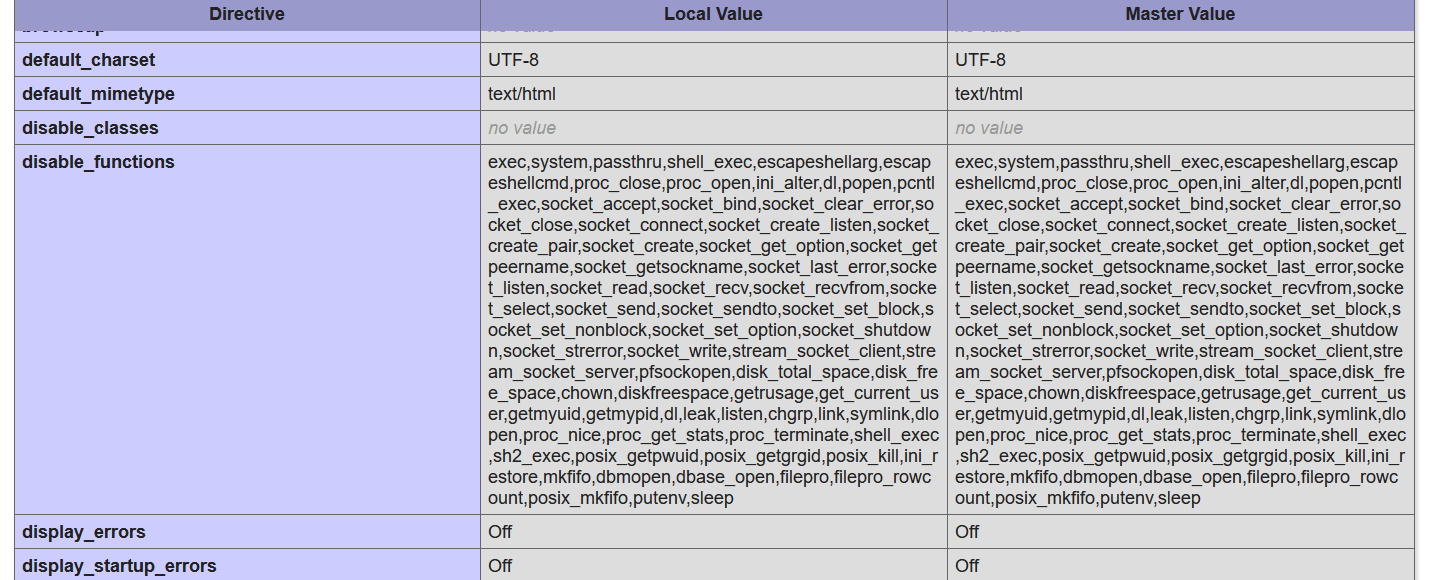
首先查看 phpinfo,如下图:
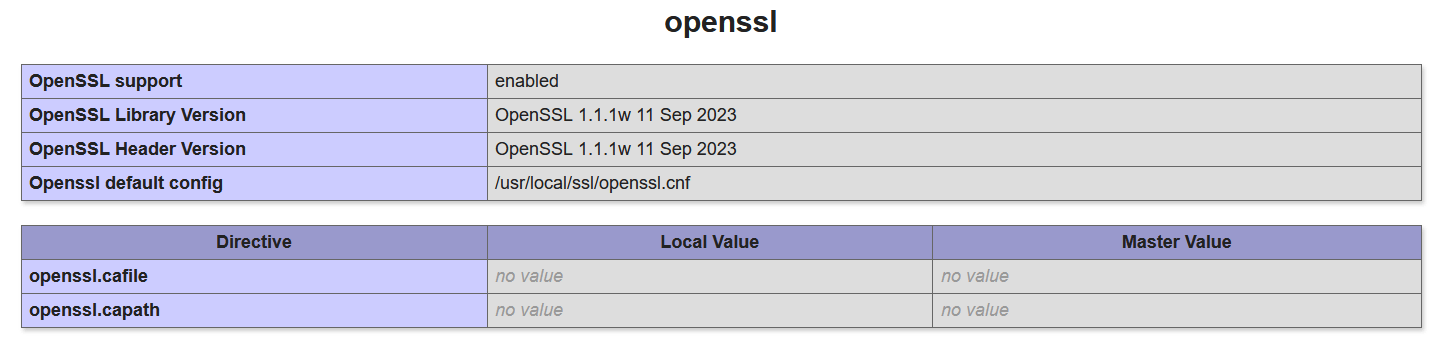
可以看到 openssl.cafile 和 openssl.capath 都是空的,这是 PHP 默认值。
尝试添加CA证书。Mozilla 在 wiki 页面上给出了 CA 根证书 Store,我这里下载 PEM of Root Certificates in Mozilla’s Root Store with the Websites (TLS/SSL) Trust Bit Enabled (TXT),命名为 ca-certificates.crt。
把从 Mozilla 下载的根证书 Store 上传到服务器上,然后修改 php.ini 或 .user.ini 文件,设置 openssl.cafile 的值为 CA 根证书 Store 路径。
比如我把下载的 CA 根证书文件命名为 ca-certificates.crt,放在 /usr/home/ 目录下,那么 CA 根证书 Store 的路径就是,/usr/home/ca-certificates.crt,在 php.ini 或 .user.ini 文件加入下面这行即可:
openssl.cafile = "/usr/home/ca-certificates.crt"Code language: plaintext (plaintext)最后再次测试,邮件发送成功,邮箱也收到了邮件,问题解决。
参考资料: