最近我发现 WP Super Cache 的缓存会频繁清空,即便我已经关闭了各种清理选项,所有缓存还是会被删除,而且这件事情发生得几乎没什么规律。打开 WP Super Cache 的 Debug 日志记录,结果发现在缓存被删除的时候日志也会被删除。本来以为是 WP Super Cache 的问题,浪费了很多时间,最后看到一个 Yoast SEO 插件的 Issue #20554 才最终锁定问题出处。
Yoast SEO 会自作聪明地调用 clear_cache() 函数导致别的插件生成的缓存被清空,而且因为日志也被删除所以这个过程没有日志记录,所以排查起来非常费时。此外不止 WP Super Cache 缓存会被清空,W3 Total Cache 缓存也会被清空。Yoast SEO 直接调用这两个缓存插件的函数,在前面板没有任何说明或者选项控制这一行为。
这个问题已经出现很久了,有很多人遇到过,然而这么多年了 Yoast SEO 一直没有修复。目前要避免 WP Super Cache 缓存被清空,只能手动修改 Yoast SEO 插件代码,在 Yoast SEO 目录中的 inc/class-wpseo-utils.php 文件(wp-content/plugins/wordpress-seo/inc/class-wpseo-utils.php)找到 clear_cache() 函数,将函数的内容注释掉,如下图所示,这样也可以防止 W3 Total Cache 的缓存被清空。
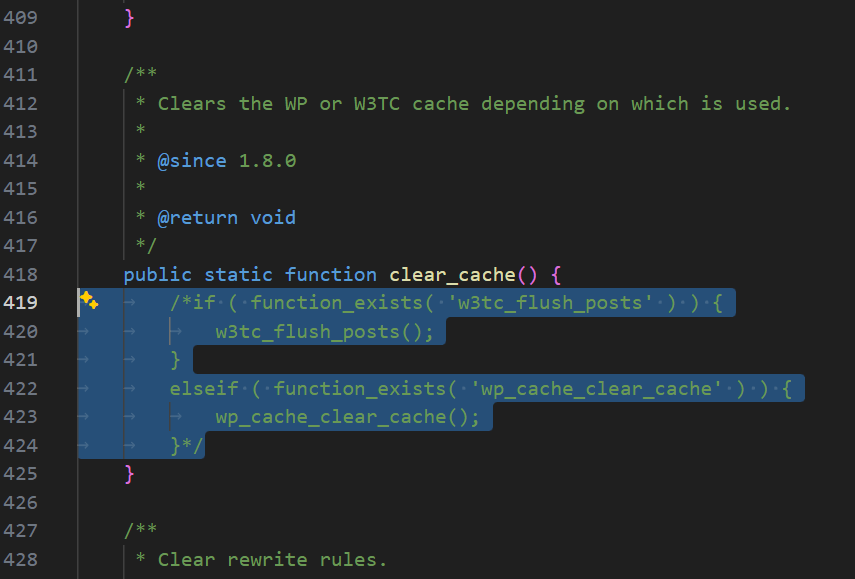
以后每次 Yoast SEO 插件升级后都要重新修改,以免它又把 WP Super Cache 和 W3 Total Cache 的缓存清空。当然,也可以考虑非必要不升级 Yoast SEO 插件。
参考资料:
- WP Super Cache cache directory gets entirely wiped after visiting admin page · Issue #20554 · Yoast/wordpress-seo
- Plugin invalidates entire cache with (W3 Total Cache) · Issue #18585 · Yoast/wordpress-seo
- WP Yoast SEO causing WP Super Cache cache clearing abnormaly | WordPress.org
- Yoast updates cause WP Super Cache purge | WordPress.org
- Yoast + Wp Super Cache, plugin constantly clears the cache | WordPress.org
发表回复