访问 WordPress 网站的 robots.txt 文件,能够获取到一个虚拟 robots.txt,其内容如下:
User-agent: *
Disallow: /wp-admin/
Allow: /wp-admin/admin-ajax.phpCode language: plaintext (plaintext)
然而去网站目录下又找不到 robots.txt 文件,因为这是 WordPress 虚拟的。
但总有一个地方定义了这些内容,不然程序怎么知道输出什么呢?没错,其定义在 wp-includes/functions.php 的 do_robots() 函数。
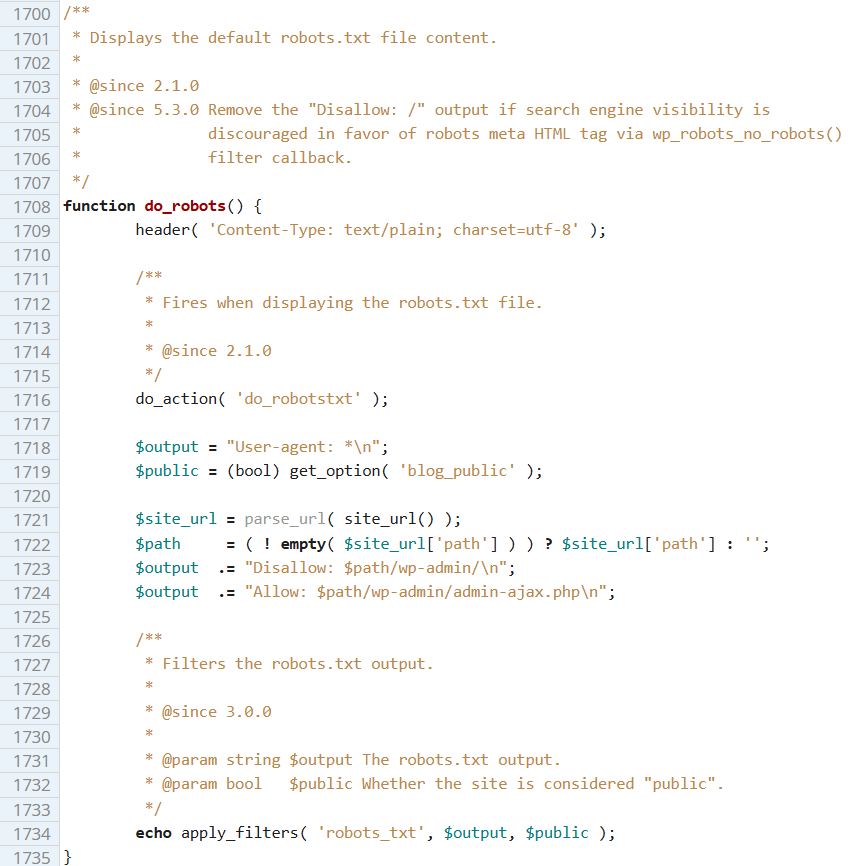
那么这个默认的虚拟 robots.txt 好不好呢?其实不好,还缺些东西,连 WordPress 官网都没有仅仅依赖这个默认的 robots.txt,还加入了别的规则,以及站点地图。
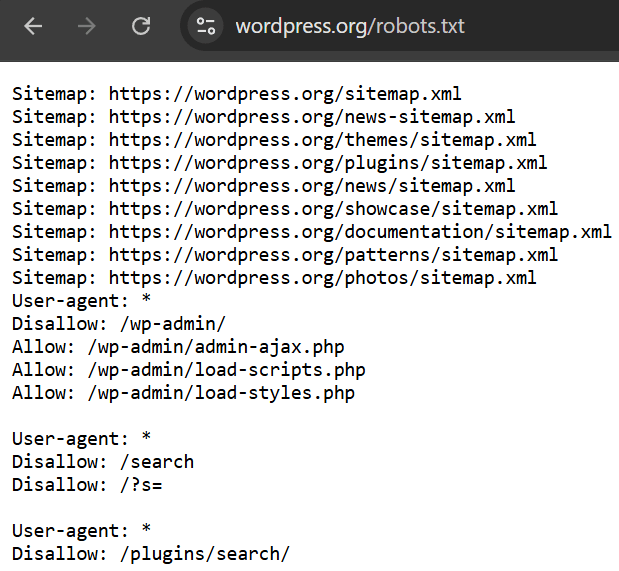
可以看到,除了默认规则外,WordPress 还禁止爬取搜索页面,这是因为有些黑帽 SEO 会滥用 WordPress 搜索结果。
综合一下,一个比较完善的 robots.txt 是这样的:
User-agent: *
Disallow: /wp-admin/
Disallow: /?s=
Allow: /wp-admin/admin-ajax.php
Sitemap: 站点地图的链接Code language: plaintext (plaintext)
保存为 txt 文件,上传至网站根目录,即可取代 WordPress 默认的虚拟 robots.txt 内容。
参考资料:
发表回复